Installer help file (setup) > Eco HVAC > Geo Lighting > Dashboard

GeoLighting: dashboard

Path:

, GeoLigting, Dashboard page


Purpose

This page displays GeoLighting trends.

Description

-

What to do first

Set operations. See the Settings page.

Page description

Page area descriptions

Area Description

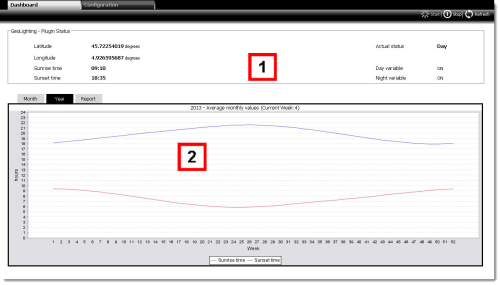
1

Area with the data calculated by GeoLighting based on the entered latitude and longitude. It includes the following fields:

  • Sunrise time: time of sunrise and, consequently, time when lights are turned off
  • Sunset time: time of sunset and, consequently, time when lights are turned on
  • Current status: current GeoLighting status (night or day)
  • Day variable: On/Off status of the variable that turns indoor/outdoor lights off/on
  • Night variable: On/Off status of the variable that turns indoor/outdoor lights on/off

Sunrise and sunset times calculated by GeoLighting can be used to automatically detect end free cooling (Free-cooling end time action setting) in function Smart Night Purge.

2

GeoLighting trends can be displayed in three ways:

  • Month: display based on a month divided into days and with real-time values
  • Year: display based on a year divided into weeks with average values
  • Report: daily sunrise and sunset times during the current week/month/year

Action

-

Other actions

Update GeoLighting to current conditions

Stop GeoLighting to manually turn lights on/off

Whenever GeoLighting is stopped, variables Day variable and Night variable are switched Off. At the next reboot, the system automatically detects whether it is day or night (Current status) but leaves Day variable and Night variable Off. Wait until the next day/night or night/day change for the lights to turn on or off.

See also

PlantVisorPRO Locale 2.2.0 - +030220771 Manual ver. 2.3 dated May, 9th 2014 - © 2007-2014 CAREL