Various printouts some with fixed format (i.e.: alarm row), others customizable by the Installer (reports) are available in PlantVisorPRO Locale. All printouts are previewed in HTML or PDF except for alarm row printouts which are sent directly to the printer.
|
|
To enable automatic report printout, see I/O Peripheral configuration, Printer (see Notification channel setup: enabling printers). Log and HACCP reports can be exported to an Excel file (.CSV). The device performance control function also produces reports. Refer to chapter Performance indicators: basic concepts. |
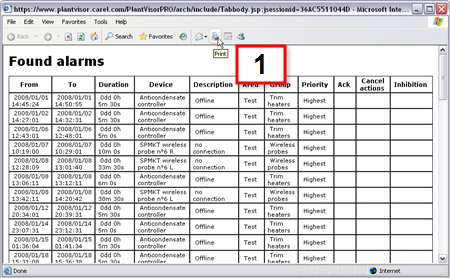
 Action
Print screen
On the browser toolbar [1] click  to print.
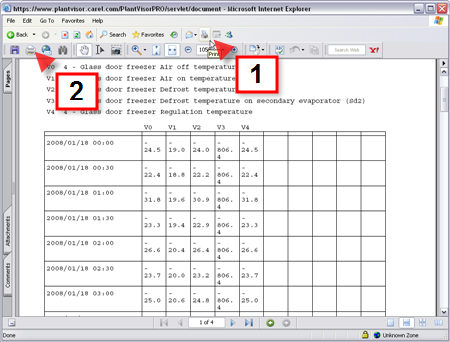
Action
Print screen
On the browser toolbar [1] click to print.
In the Acrobat toolbar [2] click  to print.
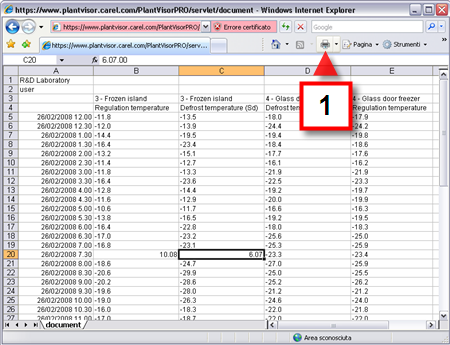
Action
Print screen
On the browser toolbar [1] click to print.
PlantVisorPRO Locale can print:
log/HACCP reports for scheduled activities, with current, daily, weekly or monthly data
Log/HACCP reports on demand with current, daily, weekly, monthly or time band data specified by the user
all site active/cleared alarms and events
active/cleared group alarms
active/cleared device alarms
active/cleared alarms that meet search criteria
alarm row as alarm or event activity action
log/HACCP graphs
|
|
All reports are based on templates set by the Installer in the Report, Configuration page. |
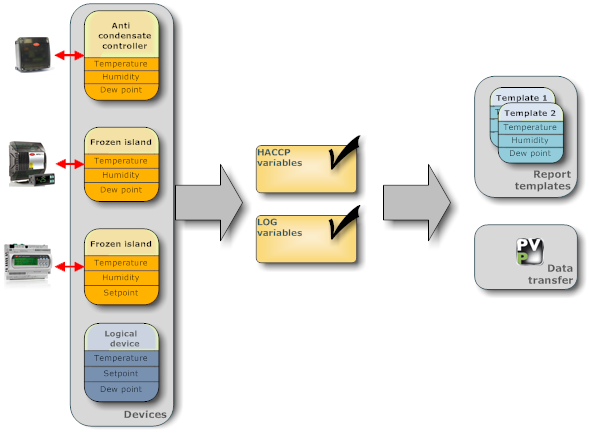
Reports are exclusively based on physical or logical device variables declared as "logs" in Device configuration, Log config (see chapter Device setup: logs).
Variables can be recorded based on parameters set by the user (log report) or on read-only parameters based on HACCP regulations (HACCP report).
For log report variables you can set:
recording length, used, for example, to keep a single device under control for a given time band.
minimum variable variation, used, for example, to reject useless samples and obtain a more accentuated curve. A high minimum variation will reject several samples and therefore the curve will be less accentuated.
sampling frequency, used to increase the number of samples and obtain a more precise curve.
For HACCP report variables, refer to the pertinent regulation (see Risk assessment and critical point control, D.Lgs. 155/97).
PlantVisorPRO Locale starts recording values as soon as device log variables are set.
Data is always available and can be used in different ways.
Transferred to RemotePRO. RemotePRO keeps a record of all site device trends. Use the Data Alignment function to select the size of the file to be transferred and the variables to be included.
Included in a log report template. Log variables must be included in a report template which, in addition to variables, set the period, layout, sampling frequency and output format. A report template can be used to manually print a report or print a report at scheduled intervals (i.e.: once a day). For printouts at set intervals, a timed activity can be created to print log report at a given time.
Report templates must be set using the Report configuration function (see chapter Periodic report configuration), and then a scheduled activity create using the Scheduled activity management function (see chapter Scheduled activities). The report remains on file even after it is printed. See function Report file (see chapter Report archive).
Variables that trigger actions. If a notification (i.e.: fax, text message - SMS) or field action (relay or variable settings) were set for an event condition caused by the result of a logic-mathematical expression between log variables, the action is executed. See function Alarm and event management, page Event conditions.
|
|
Event actions cannot be stopped. |
Included in a periodic HACCP report template. Similar to log variables.
Reports can display variable values:
Instant: the printed values will be those read at printout
Daily: printed values are those read in the last 24 hours
Weekly: printed values are those read in the last 7 days
Customized: only for printouts on demand, the period is set by the user
A time interval between samples that sets sampling frequency for reports can only be set for log reports.
|
|
HACCP reports have a set 30 minute sampling frequency. |
System limits
The system lets the user select the following log frequency/length combinations:
|
log |
1 week |
1 month |
2 months |
6 months |
12 months |
18 months |
24 months |
|
frequency |
|
|
|
|
|
|
|
|
60 min. |
X |
X |
X |
X |
X |
X |
X |
|
30 min. |
X |
X |
X |
X |
X |
X |
X |
|
15 min. |
X |
X |
X |
X |
X |
X |
|
|
5 min. |
X |
X |
X |
X |
X |
X |
|
|
2 min. |
X |
X |
X |
X |
|
|
|
|
1 min. |
X |
X |
X |
X |
|
|
|
|
30 s. |
X |
X |
X |
|
|
|
|
|
15 s. |
X |
|
|
|
|
|
|
|
10 s. |
X |
|
|
|
|
|
|
|
5 s. |
X |
|
|
|
|
|
|
Example
|
Values sampled every 1 minute |
Values reported every 10 minutes |
|
1/30/08 12.01 28.01 1/30/08 12.02 28.01 1/30/08 12.03 28.02 1/30/08 12.04 28.02 1/30/08 12.05 28.01 1/30/08 12.06 28.02 .... 1/30/08 12.10 28.05.00 1/30/08 12.11 27.06.00 .... |
1/30/08 12.00 28.01 . . . . . . 1/30/08 12.10 28.05 |
|
|
The interval between sampling must always be longer than the sampling frequency set by the variable with the lowest frequency (or highest value). For example, if the report includes:
The set interval must be >=6. The system considers the sample acquired at the time closest to the interval setting. |
 See also
Log report archive
PlantVisorPRO Locale 2.2.0 -
