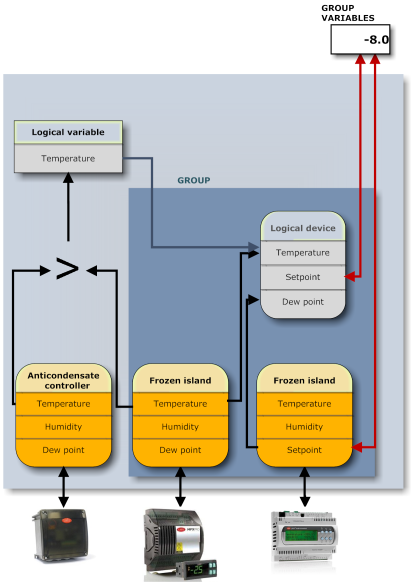
PlantVisorPRO Locale uses the following database elements to monitor the field:
|
Physical devices, derived from standard CAREL templates or custom templates, connected to PlantVisorPRO Locale via serial line with proprietor or Modbus protocols. In the setup phase, PlantVisorPRO Locale presents a list of device templates. Standard CAREL templates include their factory device setup, custom templates have their setups created in Device Editor. Data in the two setups include:
A device derived by a standard or custom template is therefore already ready for monitoring as soon as it is connected to the serial line and added in line in PlantVisorPRO Locale. |
|||
|
Custom devices |
These are devices created from models created with Device Editor which, once imported in PlantVisorPRO Locale, appear in the device model list. They are treated the same way as standard CAREL devices. |
||
|
Lines |
Group of physical devices that communicate with PlantVisorPRO Locale via the same protocol and are connected to the same serial port. |
||
|
Variables/parameters |
Variables/parameters already set in the single devices. Variable/parameter properties are contained in device templates. |
||
|
Logical variables |
Variables that contain the result of logic-mathematical functions between two or more physical device variables/parameters and constants. The purpose of a logical variable is to monitor complex situations (i.e.: arithmetic averages, maximum value, etc.). |
||
|
Logical devices |
Group of physical variables/parameters and/or logical variables. The purpose of a logical device is to combine variables (physical or logical) that have a certain pertinence (i.e.: dairy temperature) and that are best when controlled in the same way as a physical device. In fact, a logical device is similar to a physical device, with the same data (comparison in this page, Devices paragraph). |
||
|
Groups |
Group of physical and/or logical devices. The purpose of a group is to group devices:
Groups appear in Global. A group lets the user:
|
||
|
Group variables |
Device group parameters (therefore physical and logical) that can be set with a single command. |
 See also
Setting up log data to be transferred to Remoto
PlantVisorPRO Locale 2.2.0 -
