To set critical parameter control modes:
Set the list of critical parameters (max 5000) to be monitored. Either single devices or device models can be selected.
Set notification modes, indicating the control interval, addressees and whether notifications should be sent at the end of the control interval for each change (single notification) or if a single notification should be sent for all changes (cumulative notification). Select any PlantVisor PRO users who have parameter editing permission. Changes made by a PlantVisorPRO user with editing permissions do not generate notifications.
Enabling notifications.
Open the Parameters page:
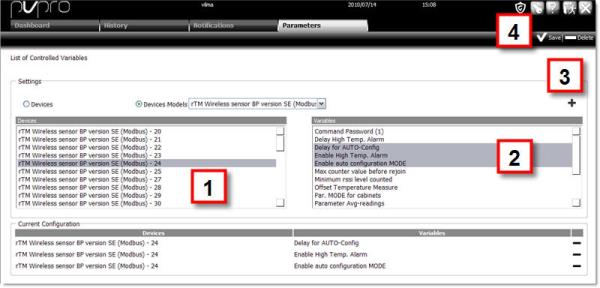
Select Devices to select parameters one device at a time. In the device list [1] double-click the selected device: all variables that can be monitored appear in the variable list [2].
Or select Device models to select parameters for all devices of a certain type. All devices in the selected model appear in the device list [1] and all variables that can be monitored appear in the variable list [2].
Select one or more variables and click  : the variables are added to the list [3].
Click  Save [4] to save the list
|
|
To select adjacent variables, hold down the SHIFT key and select the first and last variables in the selection. To select several variables, hold down the CTRL key. To delete a variable, click |
Open the Notification page:
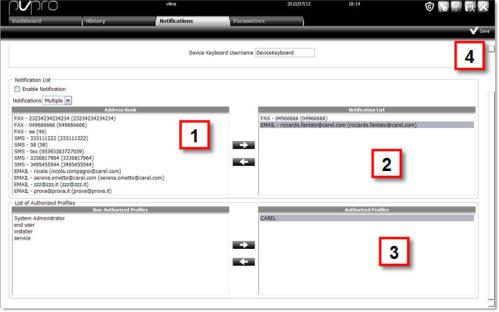
Select the appropriate interval
Enter a name for device keyboards (default DeviceKeyboard)
Specify the type of notification (one for each change or a cumulative one for all changes in the interval)
 Registrations always concern a single variable.
Select one or more notification addressees and click  [1]: addressees are added to the list [2]
Select one or more PlantVisor PRO user profiles to be authorized and click: profiles are added to the list [3].
Changes made by these profile users do not generate any registration or notification.
Click Save [4] to save entered data.
Notifications must be enabled. They may need to be temporarily disabled although still recorded in the log.
Open the Notification page:
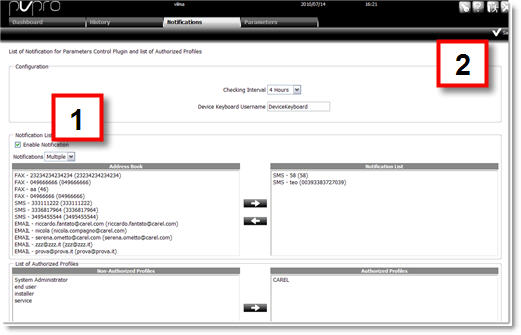
Click Enable notifications.
Click Save [2].
Enabling only effects notifications. To temporarily disable parameter control, for example during maintenance, stop it (see Stopping Parameter control). A permanent warning is displayed to remind Service that parameter control is disabled.
 See also
Parameter control: introduction
PlantVisorPRO Locale 2.2.0 -
