
Up to 10 groups can be set in a site and each group can include up to 10 meters. This for up to a total of 40 meters. Thus a maximum of four groups of 10 meters each or ten groups of four meters each can be had.
The Energy plugin supports various energy meter models. New meters can be added and their relevant power and energy variables defined.
As of the date of this document, Energy supports standard meters:
CAREL emeter1
CAREL emeter3
Ducati energia smart più
Gavazzi CPT-DIN Basic - WM14-DIN Basic - WM14-96 Basic
IME ContoD4
IME Nemo96HD
IME Nemod4
and all programmable devices that have output variables expressed in Kw and Kwh (i.e.: pLoads).
To make the analysis more precise and to indicate any areas where consumption is optimized, groups of meters that can represent homogeneous utilities (i.e.: refrigerator counters) or utilities found in a certain site area (i.e.: warehouses) can be created.
|
|
Up to 10 groups can be set in a site and each group can include up to 10 meters. This for up to a total of 40 meters. Thus a maximum of four groups of 10 meters each or ten groups of four meters each can be had. |
A site meter must be connected upstream of the entire plant to calculate the consumption by utilities not connected to meters. This meter must be linked to theGlobal group. Energy will calculate the consumption by utilities not connected to the plant by subtracting all groups' consumption from plant consumption (Global group).
Energy consumption can be monitored for a fixed cost (Fixed cost settings) or for a cost category by time slot (Time Slot settings).
When switching from fixed cost to time slot settings and vice versa, all data collected until that time is saved but only current settings data can be viewed and updated.
For time slot monitoring, the maximum settings are:
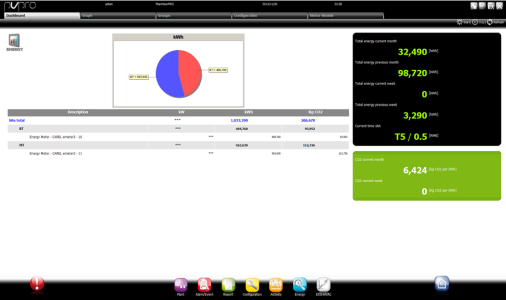
The following are indicated in the Dashboard page:
current and previous months' consumption (kWh)
current and previous weeks' consumption (kWh)
the cost category and relevant active costs (if monitoring is set for time slots)
The amount of CO2 emitted in the current month and week (Kg per kWh)
The consumption analysis will let the user find consumption that can be reduced by turning off unused utilities (i.e.: warehouse lights).
To do this, connect a control meter upstream of each group that can turn off power.
Start/stop is programmed in the Plant calendar function.
 See also
PlantVisorPRO Locale 2.2.0 -