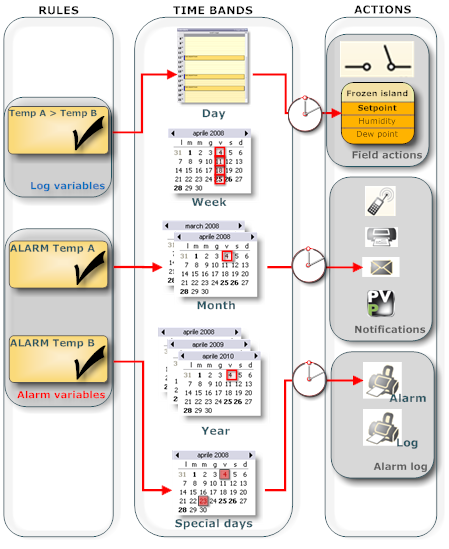
PlantVisorPRO Locale can run activities and signal faults such as:
On alarms and events:
Send a text message (SMS) to Service when a certain alarm triggers.
Send an e-mail to Service when absorbed power exceeds a set value.
Periodic frequency rules:
Send an operating signal to remote to confirm that the phone line is working.
Start defrost.
For situations not managed and detected by guardianPRO:
There are alarms that were not signaled within a certain time band.
Free hard disk space is diminishing and this could jeopardize log data recording.
Every initiative must be programmed to indicate:
the type of action (text message (SMS), relay start, etc.)
the action recipients (i.e.: phone number, relay, etc.)
In what conditions is the activity valid (i.e.: on alarm, at expiry, etc.)
In what band is the activity valid (i.e.: weekdays or holidays, from what time to what time, etc.)
All this indications (action, condition, time band) is called the rule. The rule sets the activity.
Alarm and event activities are used to prompt immediate intervention in the event of temperature rises or refrigeration unit faults. They are used to immediately and directly communicate with site maintenance personnel.
In this case, the notification action (i.e.: send a text message (SMS)), the field action (relay and variable settings) or alarm action (print alarm row, show alarm window) is only run if certain alarm conditions (i.e.: Probe 3 alarm, IR33 device) or event conditions (i.e.: Regulation temperature > Work setpoint) are met.
|
|
An event condition can include any log variable, even logical. For maintenance problems, alarm and event activities from a certain device can be temporarily by-passed. To do this, go to the Main device setup page. |
The user can vary the action if the conditions occur within certain time bands (i.e.: if alarm and afternoon time band, call remote, if alarm and night time band, send text message (SMS) to Service). Action delays can also be set.
The system checks for alarms every 30 seconds.
If the alarm is linked to an activity with zero delay, the associated action is immediately run.
If a delay was set, every 30 seconds the system checks whether the delay was exceed to run the action.
|
|
An alarm action can be run + or - 30 seconds from the set delay. But if the alarm is clear at the next check (after 30 seconds) the action is not run. Thus only actions or persistent alarms are run. |
Condition variables are log variables whose values are sampled at the frequency indicated in the device Log setup page. The system checks whether the condition is true at the end of the smallest sample period.
If the condition is true and the rule has zero delay time, the associated action is immediately run.
If a delay was set, the system check whether the condition is true at the next sample to run the action.
|
|
An event action can be run + or - 30 seconds from sampling according to the set delay. If the condition is no longer true at the next sample, the action is not run. Thus only actions whose conditions are still true are run. To guarantee correct event management, condition variable sampling times must be correctly set. |
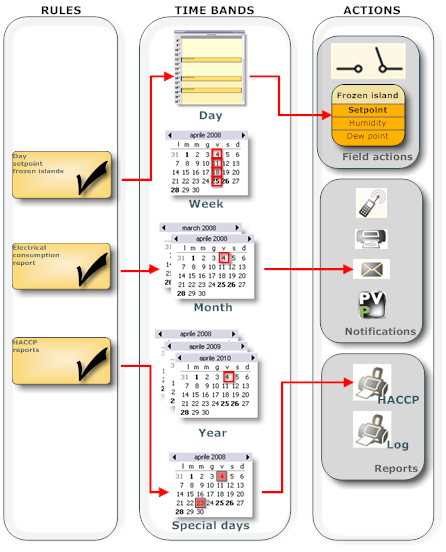
Time scheduled activities are often used to test the communications channel (i.e.: phone line) and thus make sure it is fully efficient in the event it is needed for an alarm. Or they are used to print operating reports.
The notification action (i.e.: send a text message (SMS)), the field action (relay and variable settings) or print action (HACCP or log report) will only be triggered during certain time bands (i.e.: Monday at 8 am each month). Time bands are based on recurring calendars (daily, weekly, monthly, yearly) or special calendars (i.e.: at dd/mm/yyy at time xx).
Possible actions for all activities are:
send a fax
send a text message
send an e-mail
call one or more remote supervisors
set a variable value
turn a relay on/off
Other possible actions only for alarm activities:
print the alarm
Display the alarm window with/without sound
Other possible actions only for scheduled activities:
print a HACCP or log report
In the notification channel setup phase (fax, text message (SMS), e-mail), the user can instantly create a default action for all address book contacts on the channel being set up, valid only for alarm and event activities.
This operation causes the following to be created in Alarm and event activity management:
in Actions, standard action (SMSACTIONTECH, FAXACTIONTECH, MAILACTIONTECH)
in time bands, an always valid band (Always/Sempre/Toujours/Immer)
in Condition, a generic alarm condition for all devices
in Rules, an enabled rule that include previous elements
The default action can be edited, for example, to reduce the number of recipients. The consequent rule can be disabled.
Conditions set when intervention is required:
following one or more alarms (alarm condition). An action can be triggered when:
any alarm is triggered on any device
one or more alarms are triggered on one or more devices
following a condition calculated on log variables (event condition). An action can be triggered when the values of two variables on one or two devices meet the following conditions:
logic AND (between Boolean variables)
logic OR (between Boolean variables)
equality (between two values or between the first value and a constant)
The time band sets when the activity is considered and can be:
combined with an alarm or event condition (i.e.: "If Alarm=TRUE and the time band is morning, send a text message", "if Alarm=TRUE and the time band is night, make a call").
used for scheduled activities
Time periods can be:
daily recurring (every day at from time xx to time yy)
weekly recurring (every week, on days x, y from time xx to time yy)
monthly recurring (every month, on days x, y from time xx to time yy)
yearly recurring (every year, in month z, on days x, y from time xx to time yy)
special (non recurring, in year jj, month z, days x,y, from time xx to time yy)
This warnings are independently sent by guardianPRO, on both channels used for alarm notifications (i.e.: Remoto call) and channels deemed "dedicated" (i.e.: text message -SMS).
Channels dedicated to guardianPRO notifications can guarantee notification reception even in the event of standard channel malfunctions (i.e.: if the phone line used by PlantVisorPRO is down, guardianPRO signals the fault with a text message -SMS- via GSM line).
guardianPRO and faults to be controlled must be enabled (see chapter guardianPRO setup) and notification recipients must be defined (see chapter guardianPRO system pages). For further information, see chapter guardianPRO: basic concepts. For the complete procedure, see chapter Site setup procedures.
The fax, text message - SMS-, e-mail and call message will be the description of the rule triggered (see chapter Activities: activation rules).
If guardianPRO sends a notification, the text will be the event text (see chapter Events).
 See also
Notification channels: introduction
Alarm and event activities: introduction
Scheduled activities: introduction
PlantVisorPRO Locale 2.2.0 -

