Path:
 , HVAC Smart Start, Scheduling page
|
Path: |
|
|
|
|
|
Purpose |
This page lets you set building opening and closing hours in a weekly calendar. The climate control system must reach the set point within these hours and HVAC Smart Start must start working to optimize consumption. Exceptions can take precedence over the standard calendar for which different intervals and values must be set (i.e.: a holiday). |
|
Description |
- |
|
What to do first |
Set operations. See the Settings page. |
|
|
A maximum of two daily time bands can be set, for example, from 8 AM to noon and from 2 PM to 8 PM. |
Page description
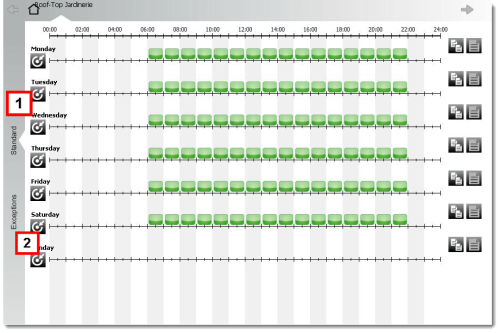
Page area descriptions
| Area | Description |
|---|---|
|
1 |
Area where the standard weekly calendar can be set |
|
2 |
Area where exceptions can be set |
 Action
 : a window will appear where you can set the interval and value
Other actions
Common used buttons
|
|
Create a new rule interval |
|
|
Copy the intervals in a day |
|
|
Paste copied intervals to another day. |
 See also
HVAC Smart Start: introduction
PlantVisorPRO Locale 2.2.0 -


