Path:
 , HVAC Smart Start, Dashboard page
|
Path: |
|
|
|
|
|
Purpose |
This page shows the HVAC Smart Start real-time trend and status for the current week. |
|
Description |
- |
|
What to do first |
Set operations. See the Settings page. |
Page description
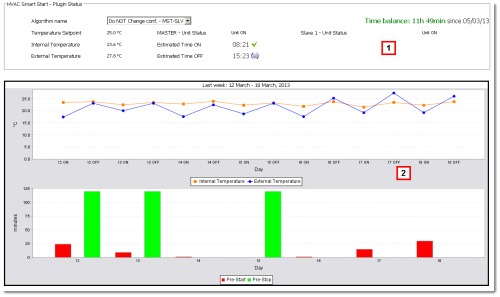
Page area descriptions
| Area | Description |
|---|---|
|
1 |
Area with HVAC Smart Start real-time data and status in the current week: Following is a description of some data:
|
|
2 |
The current weekly trend can be displayed in two ways:
|
 Action
Other actions
|
|
Start HVAC Smart Start |
|
|
Stop HVAC Smart Start |
|
|
Update HVAC Smart Start |
|
|
Reset the Time balance meter and update the date. |
 See also
HVAC Smart Start: introduction
PlantVisorPRO Locale 2.2.0 -
 if the function is still calculating the estimated time.


