Path:
 , Alarm and event management, Synoptic page
, Activity scheduler , Dashboard page
|
Path: |
|
|
|
|
|
Purpose |
Graphically displays activity rules. |
|
Description |
- |
 Action
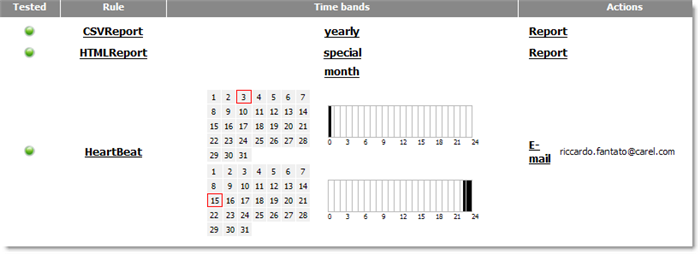
Displayed data
|
Status |
|
The communications channel used by the rule was tested. |
|
|
|
The rule was not yet tested (see chapter Notifications-channels: test). |
|
Rule |
Name of the adopted rule Link to the Rule page with selected rule. |
|
|
Condition |
Name of the alarm condition or description of alarm selection priority. Link to the Alarm conditions page with selected condition. |
|
|
Time bands |
Graph that shows the periods in which the rule is applied (green period). Link to the Time band page with the selected time band. |
|
|
Action |
Action addressees or variables. Link to the communications channel page used in Action settings. |
|
 See also
Notification channel setup: introduction
Data administration to/from Device Editor
Alarms and events: basic concepts
PlantVisorPRO Locale 2.2.0 -

