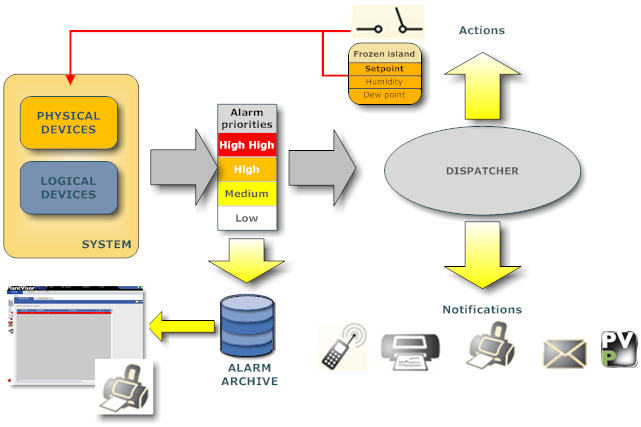
PlantVisorPRO Locale manages field and system fault situations and, in general, all condition change situations on two levels:
alarms: from single field device alarm variables
events: signals automatically generated by system components:
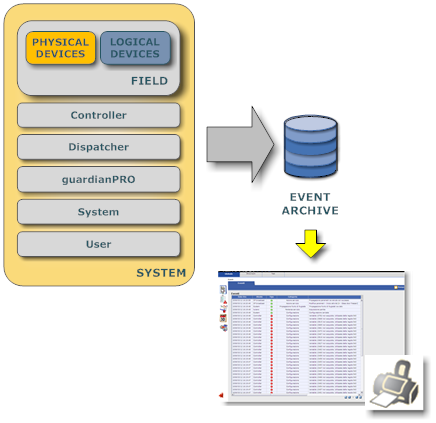
Controller: supervises product operations. Interfaces with guardianPRO to signal faults and system blocks.
Dispatcher: manages all PlantVisorPRO Locale outputs: generates alarms, open/closes relays, prints, sends e-mail.
guardianPRO o Guardian: monitors correct PlantVisorPRO Locale and system operations.
Field or Field connector: gathers information on all field devices using installed protocols
System: collects system events (i.e.: acquisition start)
or signals on operations performed by the connected user
|
|
For further information on system components, refer to chapter System architecture. |
PlantVisorPRO Locale can display:
all site active/cleared alarms and events
active/cleared group alarms
active/cleared device alarms
active/cleared alarms that meet search criteria
alarm row as alarm or event activity action
Alarms are exclusively based on the physical or logical device alarm variables enabled in the Device configuration, Alarm variables page (see chapter Device setup: alarm variables).
An alarm variable must be assigned a priority which is displayed in different colors and control frequency must be set:
|
|
|
Alarm status management policies must be linked to each priority. See chapter Site setup: alarm priorities). A maximum time must be set for which guardianPRO will intervene if an alarm is not cleared It must also be set whether alarms in that priority level can be acknowledged by the user.
As soon as a device setup is saved in the database, PlantVisorPRO Locale begins to control alarm variables and collect events every 30 seconds.
Site alarms. All alarms are displayed in:
Global monitoring, Main page and Alarm page (see chapter Monitoring: alarm list).
Alarm monitoring (see chapter active alarms)
Group alarms. If the device in alarm conditions belongs to a group, alarms are displayed in the SITE monitor Global, <groupName>,Main page and Alarm page (see chapter Monitoring: alarm list).
Device alarms. Alarms are displayed in Device detail monitoring, Main page and Alarm page (see chapter Device monitoring).
Alarms that trigger actions. If a notification (i.e.: fax, text message - SMS) or field action (relay or variable settings) were set for an alarm condition from one or more variables on one or more devices, the action is executed. See function Alarm and event management, page Alarm conditions.
An alarm action can be inhibited by the user in the Alarm detail function (see chapter Alarm details).
|
|
Actions that use notification channels (fax, text message, e-mail, remote call) may be set to conduct several attempts. |
Print alarm row. If a print alarm row action was set for an alarm condition from one or more variables on one or more devices, the action is executed. See function Alarm and event management, page Alarm conditions.
|
|
The action prints an alarm row for each of the variables in alarm. |
Device alarm. The status LEDs in the Global, group or Device detail monitoring page turns red if at least one variable (regardless of the priority) is in alarm (see chapter Device: basic concepts).
Cleared alarms. When the alarm variable returns to normal status or when the user clears a less significant alarm (see chapter Alarm details), the system turns the active alarm into a cleared alarm.
|
|
Alarms and events can be searched, isolating events from certain contexts (areas, groups, devices) see chapter Alarm search. active and cleared alarms, on the Global, group or device levels, can be printed. |
Alarms transferred to PlantVisorPRO Remoto. RemotePRO regularly acquires all alarm data.
To maintain units controlled by a device (i.e.: frozen basin cleaning), alarms may need to be disabled.
To fully disable a device, only leaving off line alarm management and data recording on, go to Line details. Device status becomes  (blue).
To only disable alarm and event activities for a device, see chapter Device setup, main page.
Site events. All events are displayed in Event monitoring (see chapter Events).
Events sent to RemotePRO. PlantVisorPRO Remoto regularly acquires all event data.
|
|
An action cannot be triggered on event. "Event conditions" can be created and become true when two log variables or a variable and a constant meet a set condition. See chapter Activities: event conditions. |
 See also
PlantVisorPRO Locale 2.2.0 -


